

A reminder at 8 a.m. may fit an opening shift and interrupt sleep before a closing shift. A daily checklist can also become noise when it appears on a day you are not working. Retail routines need a schedule that reflects the person doing the work.
Start by separating a routine's purpose from its clock time. Reviewing the previous handoff belongs near the beginning of your shift. Preparing your own handoff belongs before its end. Other work has a genuine fixed deadline and should keep that deadline visible.
Retail discussions describe frustration with unpredictable hours and contact during time off. Those are workplace issues an app cannot solve by itself. They are also a reason to make the reminders you control more deliberate. Retail discussion about contact outside scheduled work.
Keep your saved shifts accurate
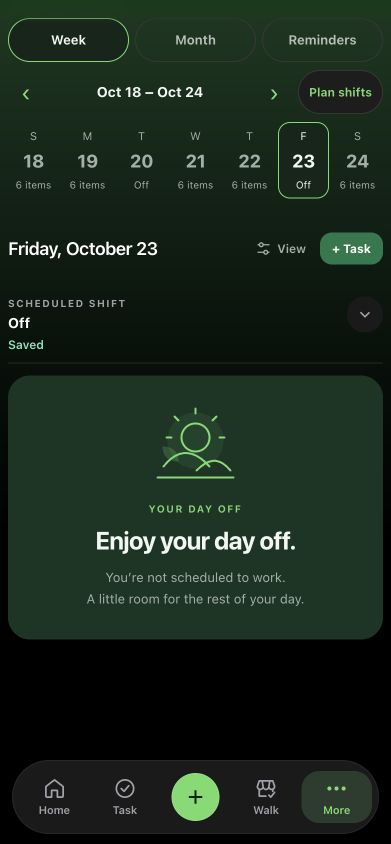
A schedule-aware reminder is only as useful as the schedule behind it. Set the hours you actually expect to work, then review changes when a swap or exception is confirmed. Add days off and planned time away rather than assuming a repeating pattern will cover them.
For a changing retail week, a quick schedule review before the week begins can be more useful than creating extra alerts. Check shift starts, shift ends and exceptions first. Then check the routine times against those hours.
Taldi uses the shifts and time off you save. It does not infer that you have arrived at the store or track attendance for an employer. Keeping that distinction clear helps you know what to update when plans change.
Anchor the work to the right moment
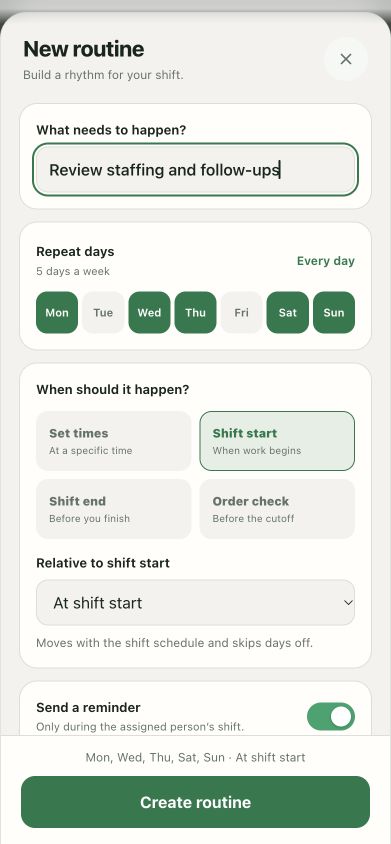
Think about the dependency behind each routine. “Review incoming handoff” depends on your shift beginning, so a shift-start anchor makes sense. “Prepare unresolved follow-ups” belongs before your shift ends. A fixed-time review is appropriate when a call or agreed deadline actually happens at that time.
In Taldi, routines can use set times or timing relative to shift start and shift end. You can also select opening-only or closing-only applicability when that fits the work. Start with one opening routine and one closing routine instead of importing every possible checklist.
Make the names specific enough to act on. “Review open department follow-ups” provides a clearer starting point than “opening duties.” A short list of useful checks is easier to keep current.
Give each notification a reason to interrupt
Not every routine needs a push notification. Some belong in a checklist you already review. Use a reminder when missing the timing would create a meaningful problem, or when you regularly lose the step among other work.
Review the day's reminder plan before adding more. If several alerts arrive together, consider whether one review point would be enough. If a reminder is repeatedly dismissed, inspect the timing and wording before assuming you need a louder alert.
Taldi's work-schedule filtering is designed to keep eligible routine and scheduled reminders within saved work hours. Enable the schedule and check its settings. iPhone notification permissions and device settings still affect what appears; a reminder is not proof that someone saw or completed the work.
Make an explicit plan for work that continues after you leave
A reminder that respects time off should not hide a responsibility that still needs attention. Decide whether unfinished work can wait until your next shift or needs an on-duty owner. For the second case, use the agreed handoff and escalation channel before leaving.
For example, a routine review of next week's priorities may wait. A pending equipment response may need to pass to the incoming manager. That is an ownership decision, not something a quiet notification setting can make for you. Follow your operation's procedures for urgent matters.
A clear shift handoff records the current status, next action, owner and review time. It gives the next person something useful to continue while allowing your personal task system to pause.
Review the routine after several shifts
After trying a routine across opening and closing shifts, ask whether it appeared at a useful moment, whether it needed a notification, and whether its wording made the next action clear. Remove duplicated checks. Adjust timing when the schedule changes.
Taldi can hold those routines, reminders and follow-up notes together. The aim is a system you can return to with confidence: ready when you are working, and shaped around the time off you have saved.