
Tasks that keep their context
Departments, priorities, due dates, and follow-up steps. Find the work when you need it.

YOUR RETAIL SHIFT COMPANION
A sick call in bakery. Eggs to check before Thursday’s sale. A labor update for your district manager.
Keep the follow-ups, routines, and handoffs in one place. Pick up where you left off.
14 days to try it on your shifts. Built for iPhone.
A sick call.
A callback.
A conversation to finish.
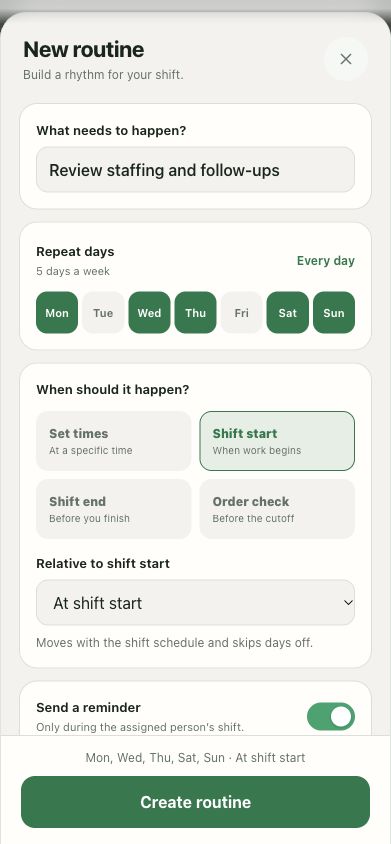
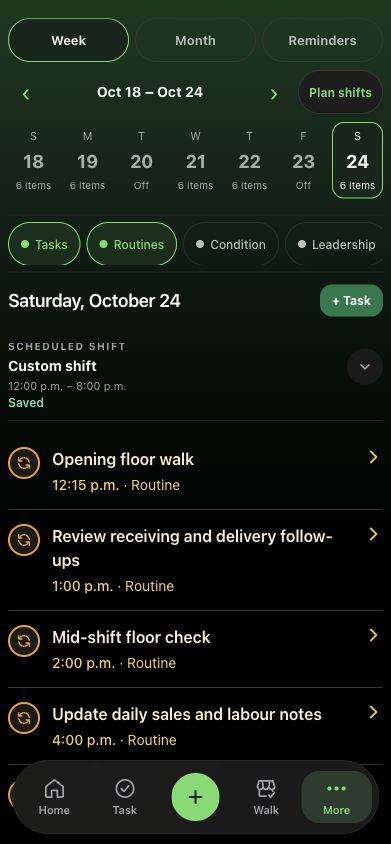
Actual Taldi app · fictional demo workspace. Routine shown is a setup example.
Made for the people who keep the store moving.
FROM OPEN TO HANDOFF
Your shift changes. Taldi gives the work a place to stay.
A quick request shouldn’t have to live in your head. Add the task, give it a department and a due date, and keep its next steps together.
Build routines for the work that comes around every shift.
THE WHOLE SHIFT, TOGETHER
Departments, priorities, due dates, and follow-up steps. Find the work when you need it.
Opening, closing, and everything in between. Reuse the steps you depend on.

Record observations, rate departments, and keep track of what needs another look.

Smart reminders follow the shifts and days off you save. Keep routines ready for work, with less noise when you’re off.

Keep your personal schedule and sales notes alongside the work they help explain.
Bring together progress and outstanding work. Review the details before you share.
READY FOR WORK. ROOM FOR LIFE.
Opening today, closing tomorrow? Set routines around the start or end of your saved shift. Give a reminder a useful moment to arrive.
Add your days off and time away. Taldi’s work-aware routines skip those days, so the next check can wait for your next shift.
Uses the schedule you save, not location tracking. Enable your work schedule; notification permissions and device settings apply.
Build a calmer routine ↗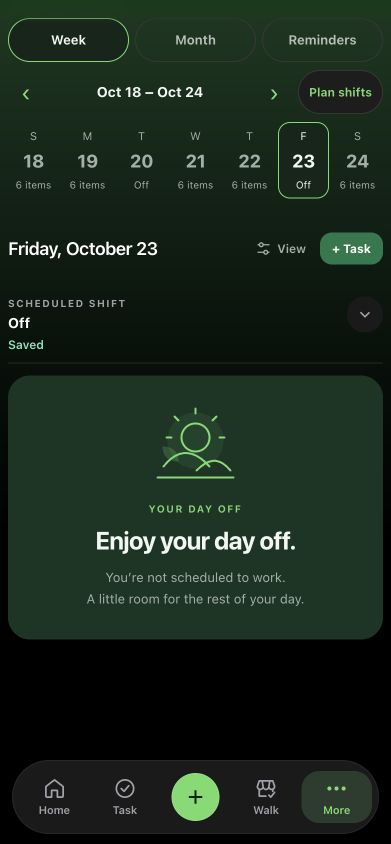
A HAND WHEN YOU NEED ONE
Ask about your work, turn rough notes into a task draft, or get help putting a handoff into words.
Review AI suggestions before they become work or leave the app. You stay in charge.
See what the AI allowance includes Ask TaldiSample
Ask Jacob how many eggs are coming in on tonight’s order to support Thursday’s sale price.
A useful draft. Your final say.
TRY IT ON A REAL SHIFT
Try Taldi free for 14 days on a monthly or annual plan.
No permanent free tier. Keep going if it earns its place.
Your trial includes all core tools, 40 AI requests, and 5 minutes of in-app voice.
USD · billed monthly after your trial
Cancel at least 24 hours before the trial ends to avoid a charge.
USD · about $8.33/month, billed annually
$99.99/year after 14 days. Cancel at least 24 hours before the trial ends to avoid a charge.
Apple-managed team seats · coming soon
Contact us ↗Prices shown in USD. Local pricing and applicable taxes are shown before purchase. Monthly and annual subscriptions renew automatically until canceled.
One successful cloud AI request uses one request from your allowance. This includes messages, drafts, summaries and background task reviews. A follow-up is another request; failed requests are returned. Optional dictation cleanup and sending the result are separate requests. In-app voice has a separate minute allowance on subscription plans. Recorded voice fallback also uses one AI request per message.
The trial includes 40 requests and 5 voice minutes in total, with no mid-trial reset. Paid allowances reset on the first of each month at 00:00 UTC. Reaching an AI limit doesn’t stop your tasks, routines, or manual notes while your trial or subscription is active. Your remaining allowance and reset date are shown in the app.
ONE TEAM. EVERYONE’S NEXT STEP.
Bakery coverage. A service callback. The next district check-in.
We’re preparing a way for one manager to pay for Taldi seats, while each person keeps their own account.
Planned in-app group purchases will use Apple’s invitation and seat-management flow. Each invited employee will receive their own access to Taldi.
Our planned package gives each paid seat 100 AI requests and 20 voice minutes per calendar month. One person’s busy shift won’t use another person’s allowance.
Planning a larger rollout through Apple Business? Tell us how your store works. We’ll discuss the right scope and confirm availability before you commit.
Planned team pricing: $9.99/month or $99.99/year USD per seat. Local App Store prices and taxes will apply. Team trial eligibility will be confirmed before launch. Buying a seat will not automatically share an employee’s tasks or notes; sharing remains a separate choice.
Team checkout is not available in Taldi yet. Apple’s in-app group purchasing rollout and Taldi’s access testing must finish first. Talk to us about your team ↗
A FEW GOOD QUESTIONS
Taldi starts with your own shift: your tasks, routines, walks, and handoffs. Individual monthly and annual plans are the launch offering. Apple-managed team seats are planned, so a manager can pay for employees who each use their own account. Explore team access or contact taldi@zenivadigital.com.
Eligible new subscribers get 14 days on a monthly or annual plan. Your chosen subscription starts billing after the trial unless you cancel at least 24 hours before it ends. There is no ongoing free plan.
No. Capture tasks, write notes, run routines, and record your walks yourself. AI is optional help with drafts and questions. Trial and paid AI allowances are shown above.
Taldi is being built around iPhone first. A desktop app is planned for the future; it is not available yet. This website introduces Taldi and its iPhone experience.
Your subscription stays active until its paid period ends. After that, saved work stays available to read and export. Creating new work and using AI require an active plan. You can manage subscriptions through Apple.
No telephone calls are included at launch. Monthly and annual plans include a limited allowance for voice conversations with Taldi inside the app.
THE TALDI JOURNAL
Practical guides for the work between the interruptions.
 SHIFT NOTES · 01
A practical way to capture retail follow-ups, recover interrupted work, and keep sick calls, equipment issues, and district requests in view.
Read the guide ↗ SHIFT NOTES · 02
Use a simple retail handoff format for staffing changes, equipment follow-ups, district requests, and unfinished work without rewriting the whole shift.
Read the guide ↗ SHIFT NOTES · 03
Set opening and closing routines around your actual shifts, review reminder timing, and leave work ready for your return without adding noise to days off.
Read the guide ↗Give the next thing a place to go.
For iPhone. For your very real shift.